What To Do If You Forgot Your iPhone Lock Screen Password?
Forgetting the passcode used to unlock an iPhone can be frustrating, especially when you need immediate access to your photos, messages, applications, and other personal information. Entering the wrong passcode repeatedly will not reveal the correct combination, and after several failed attempts, the device may become unavailable for a period of time.
If I forgot my iPhone
lock screen password is the situation you are facing, there is no need
to panic. Apple provides official recovery options that allow users to erase
and restore a locked iPhone. Depending on the iOS version, whether you remember
your Apple Account credentials, and whether you have access to a computer, the
appropriate recovery method may differ.
The most important point to
understand is that recovering access to a passcode-locked iPhone generally
involves erasing the device. If you have a recent backup in iCloud or on a
computer, you can restore your personal data after the reset.
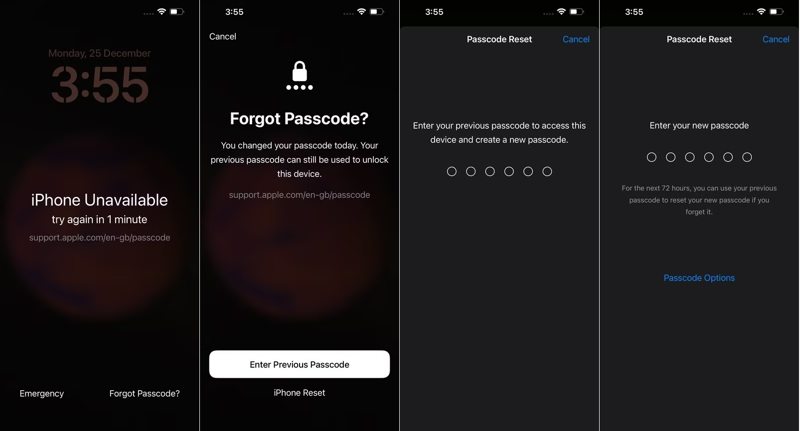
Can You Reset An iPhone Without A Computer?
Newer iPhone models and supported
iOS versions offer a convenient way to reset a locked device directly from the
lock screen. When the appropriate option appears after repeated incorrect
passcode attempts, you may be able to erase the iPhone without connecting it to
a Mac or PC.
This is particularly useful for
users who want to resolve I forgot my iPhone lock screen password without
downloading additional software.
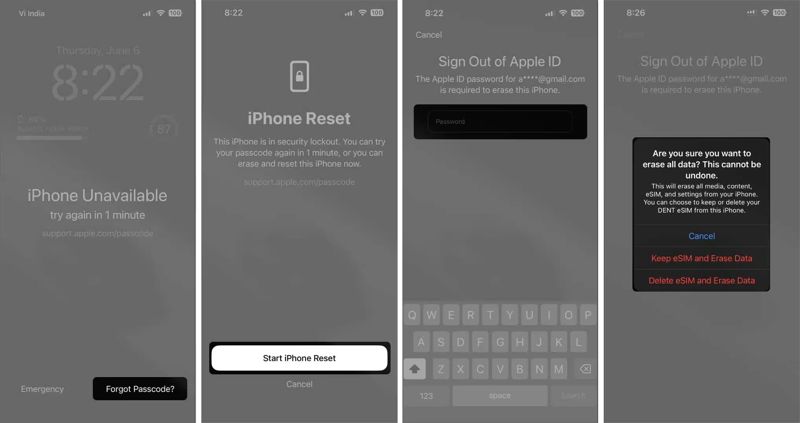
The exact wording displayed on
the lock screen can vary depending on the iOS version. You may see options such
as “Forgot Passcode?” or “Erase iPhone.” Selecting the available option starts
the recovery process.
You will generally need to
authenticate with the Apple Account associated with the device. The iPhone must
also meet the requirements for the on-device reset process, including network
connectivity.
Because this procedure erases the
device, make sure you understand the consequences before proceeding.
What Happens When You Erase A Locked iPhone?
Resetting an iPhone because of a
forgotten passcode is not the same as simply changing the passcode. The erase
process removes the information stored locally on the device and returns the
iPhone to its initial setup state.
After the reset, you can set up
the iPhone again and restore a backup if one is available.
Before starting the process, keep
these points in mind:
- The information currently stored on the iPhone may
be erased.
- An iCloud or computer backup can allow you to
recover your previous data.
- You may need your Apple Account credentials during
setup.
- Activation Lock can remain enabled after the device
is erased.
- A stable internet connection can be necessary for
certain recovery options.
Therefore, if I forgot my iPhone lock screen password describes your situation, checking whether you have a recent backup and whether you remember your Apple Account password is an important first step.
How Can You Restore An iPhone Using Recovery Mode?
If the direct erase option is
unavailable, recovery mode is another official method. This approach requires a
computer and a compatible USB cable.
On a Mac, Finder can be used to
manage the recovery process. On supported Windows setups, Apple's device
management software can be used. The exact button combination required to enter
recovery mode depends on the iPhone model.
Once the device enters recovery
mode, connect it to the computer and select the restore option when prompted.
The computer will download the necessary software and reinstall iOS on the
iPhone.
This procedure is useful when the
phone cannot be accessed normally or when the lock-screen recovery option is
not displayed.
However, recovery mode does not
bypass Apple's security mechanisms. After the restoration, the iPhone may ask
for the Apple Account credentials associated with the device.
Why Is Activation Lock Important After A Reset?
One of the most important
security features to understand is Activation Lock. Erasing an iPhone does not
necessarily remove its association with the owner's Apple Account.
Activation Lock is designed to
prevent unauthorized use of a lost or stolen iPhone. Consequently, if you reset
your own device after forgetting its passcode, you may still need to sign in
with the Apple Account previously connected to it.
This is why you should never
assume that resetting the phone will remove all account-related security
requirements.
If you purchased a used iPhone
and encounter an Activation Lock screen belonging to another person, the
previous owner needs to remove the device from their account. A third-party
unlocking application should not be treated as a legitimate method for
bypassing someone else's ownership protection.
Can Third-Party iPhone Unlocking Tools Be Trusted?
There are many applications
online that advertise themselves as solutions for forgotten iPhone passcodes.
Some claim to remove screen locks quickly or solve complicated recovery errors.
However, users should be cautious
when considering third-party software. A program that requests extensive
permissions, Apple Account credentials, or sensitive personal information can
create additional security and privacy risks.
If I forgot my iPhone
lock screen password and I cannot access my device, the safest
approach is to begin with Apple's official recovery options. If those options
do not work, consulting Apple Support or an authorized service provider is
generally preferable to installing unknown unlocking software.
Third-party tools may also have
limitations based on the iPhone model, iOS version, device condition, or
security configuration. Claims of guaranteed access should therefore be treated
carefully.
What If You Forgot Your Apple Account Password Too?
A forgotten iPhone passcode and a
forgotten Apple Account password are two separate problems. Resetting the
device may solve the screen-lock issue, but you could still encounter an
account verification step afterward.
If you do not remember the
password for your Apple Account, you should recover that account through
Apple's official account-recovery process before or during the device setup
process.
Having access to the correct account credentials can make the entire recovery procedure significantly easier and can help you restore information from an existing backup.
How Can You Prevent Another Forgotten Passcode?
Once you regain access to your
iPhone, taking a few precautions can reduce the possibility of experiencing the
same problem again.
Choose a passcode that is
difficult for others to guess but still memorable to you. Avoid writing it in
an insecure location or sharing it with other people.
You should also keep your iPhone
regularly backed up. A current backup can be extremely valuable if you lose
access to your device, accidentally erase it, or need to replace it.
Face ID or Touch ID can make
everyday unlocking more convenient, but remember that Apple may occasionally
require the device passcode for security reasons.
What Is The Best Solution For A Forgotten iPhone Passcode?
There is no legitimate method
that simply reveals a forgotten iPhone passcode. Instead, Apple's recovery
process is designed to protect the device while allowing its rightful owner to
regain access.
If I forgot my iPhone lock screen password is your current problem, first check whether your iPhone provides the built-in erase option. If that option is unavailable, recovery mode using a Mac or PC is the next official route.
After the reset, you may restore
your information from a backup and sign in with the Apple Account associated
with the device. If you are unable to complete the process, Apple's official
support channels can help determine the appropriate next step.
Ultimately I forgot my
iPhone lock screen password does not necessarily mean that your iPhone
is permanently unusable. With the correct account credentials, a suitable backup,
and Apple's supported recovery procedures, you can reset the device and return
it to normal use while maintaining the security protections built into iOS.