How to Turn Off YouTube Watch History on Any Device

YouTube keeps track of the videos you watch when your Google account’s watch history is enabled. This feature makes it easier to revisit previously watched content and helps YouTube personalize video recommendations based on your interests. However, not everyone wants their viewing activity saved automatically.
If you prefer greater control
over your account activity, you can change your YouTube history settings in
just a few steps. Turning off YouTube watch history prevents new videos
you watch from being added to your account’s watch history while the setting
remains disabled.
It is important to understand
that pausing watch history is different from deleting existing records.
Previously saved videos generally remain in your history until you remove them
separately. Whether you use YouTube on a computer, Android phone, or iPhone,
the following guide explains how to manage your settings and choose the option
that best suits your needs.
Why Should You Turn Off YouTube Watch History?
YouTube watch history serves two
main purposes: helping you find previously watched videos and providing
information that can influence personalized recommendations. Although these
features can be convenient, some users prefer not to have their viewing
activity recorded.
For example, you might
occasionally watch videos about subjects that do not reflect your usual
interests. You may also share a device with other people or simply want to
limit the viewing activity saved to your Google account.
Disabling watch history can help
you manage these preferences. However, it does not make every aspect of your
YouTube activity private. Other account settings and services may still retain
different types of information, so it is worth reviewing your broader Google
privacy controls if privacy is your main concern.
How Can You Turn Off YouTube Watch History on a Computer?
You can manage your watch history
directly through your Google account. You do not need to install additional
software or change your browser settings.
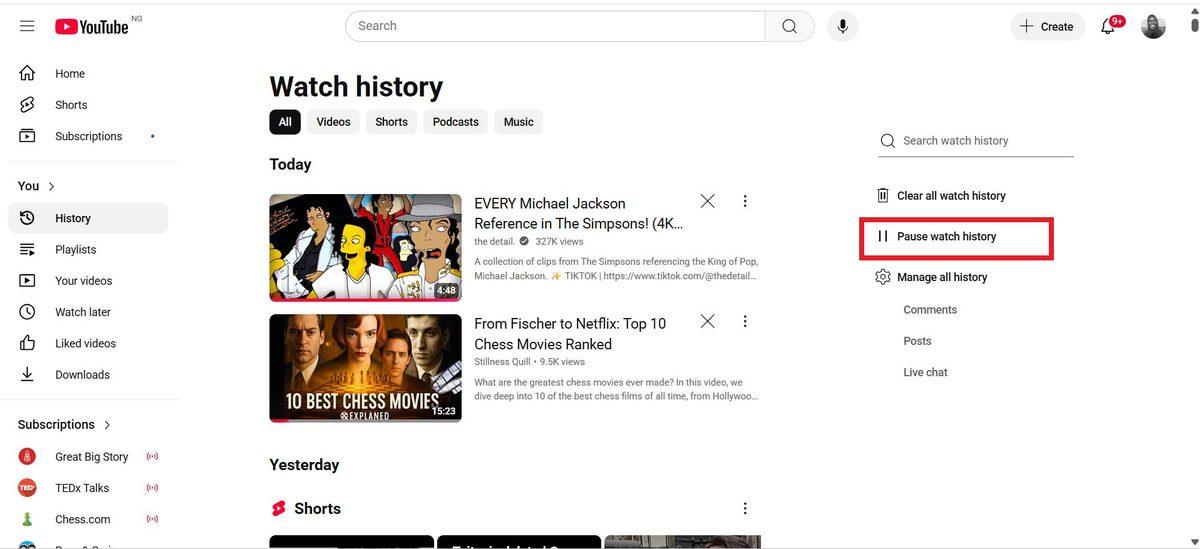
Follow these steps to pause the
recording of watched videos:
- Open your Google Account and sign in with the
account you use for YouTube.
- Navigate to the YouTube History page.
- Open the controls for your YouTube activity.
- Find the option that includes videos you watch in
your YouTube history.
- Turn off the relevant setting or choose the option
to pause YouTube watch history.
- Review any confirmation message and confirm your
choice if prompted.
The exact wording and layout may
vary depending on Google's current interface. Make sure you change the setting
for watched videos rather than deleting your existing history.
You can also manage YouTube
search history separately. If you only want to stop watched videos from being
recorded, you do not necessarily need to disable the recording of searches.
After you save the change, new viewing activity should no longer be added to your watch history while the setting remains paused.
How Do You Disable Watch History on Android and iPhone?
You can change your watch history
preferences without using a computer. The YouTube mobile app provides access to
your account's history management options.
On most current versions of the
app, follow these steps:
- Open the YouTube app on your Android phone or
iPhone.
- Tap your profile picture.
- Select Settings.
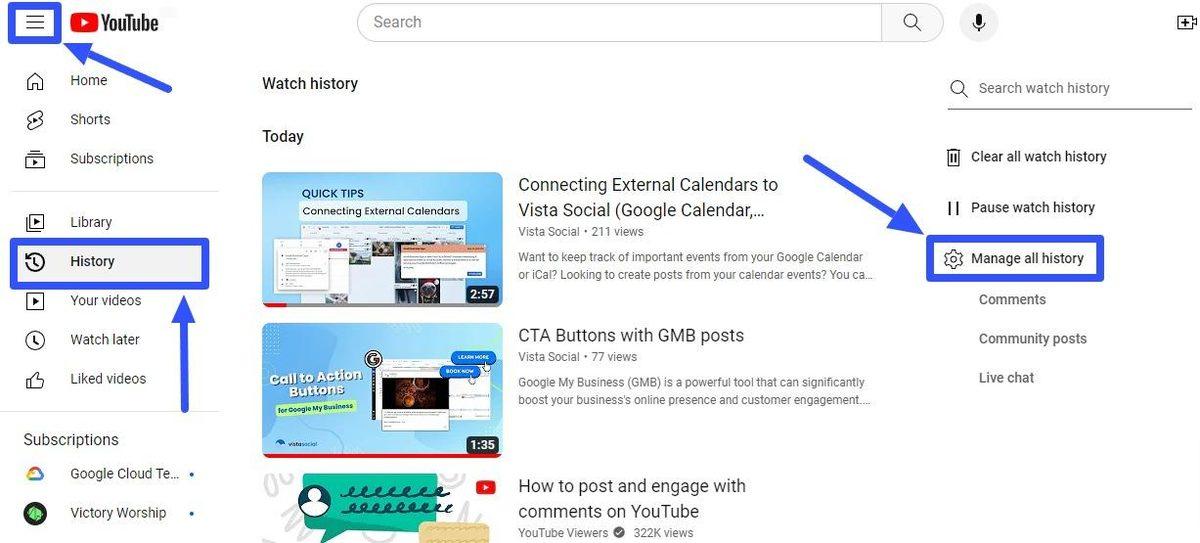
- Open Manage all history, or the equivalent history
management option available in your version.
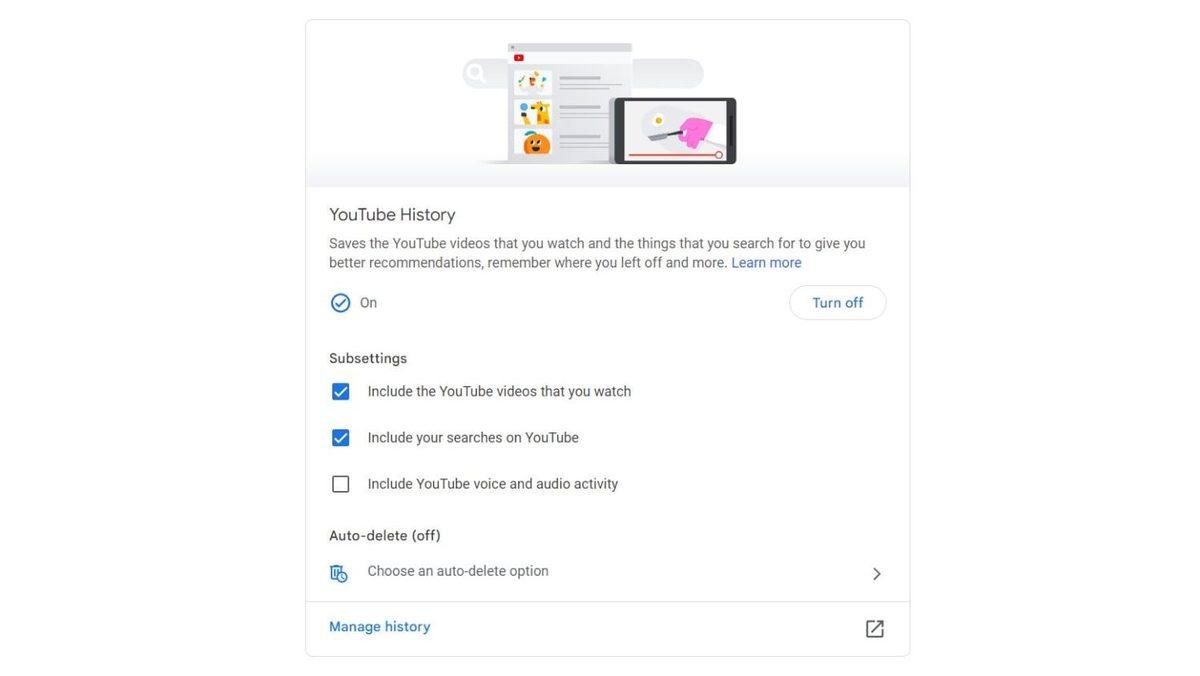
- Navigate to the Controls tab.
- Locate the setting for including watched YouTube
videos in your history.
- Disable the option and confirm your choice if
requested.
If you cannot find the setting in
the app, open your Google Account's YouTube History controls in a web browser
instead.
Remember that you are changing an
account-level preference, not simply hiding history on one device. The setting
can affect YouTube activity associated with the same Google account across
supported devices.
What Happens When You Turn Off Watch History?
Turning off YouTube watch
history stops new eligible viewing activity from being saved to your
account's watch history while the setting is disabled. However, it does not
automatically remove videos that were recorded previously.
There are three different history
management options worth understanding:
- Pause watch history: Stops new watched-video
activity from being recorded while the setting is disabled.
- Delete watch history: Removes previously saved
viewing activity according to the deletion options you select.
- Set up auto-delete: Automatically removes eligible
historical activity after a selected retention period, when the option is
available.
These settings serve different
purposes. If you only want to prevent future videos from appearing in your
history, pausing the feature is usually sufficient. If you want to remove older
records as well, you must manage those records separately.
You can also remove individual videos from your history instead of deleting everything. This approach is useful when you want to keep most of your viewing records but remove a few specific entries.
Will Turning Off Watch History Change Your YouTube Recommendations?
YouTube uses viewing activity as
one of several signals for personalizing recommendations. When watch history is
paused, new videos you watch will not contribute to your watch history in the
usual way.
As a result, your homepage
recommendations may become less personalized over time. The effect depends on
your existing history and the other signals available to YouTube.
For accounts with little or no
eligible watch history, YouTube may limit or remove homepage recommendations
that depend on viewing history. The homepage may therefore look different from
what you are used to.
This change does not necessarily
indicate a technical problem. If you enable watch history again and continue
watching videos, YouTube can begin using eligible new viewing activity to help
personalize recommendations.
Turning off YouTube watch history is therefore a useful option if you want more control over saved viewing activity, but it may also affect how easily you discover videos that match your interests.
Can You Watch Videos Without Saving Them to Your History?
Yes. If you only want to avoid
recording a few videos, you may not need to pause your entire watch history.
YouTube's Incognito mode on supported mobile devices can provide a more
convenient alternative.
To activate it in the YouTube app
on Android:
- Tap your profile picture.
- Select Turn on Incognito, if the option is
available.
- Watch videos while Incognito mode is active.
- Turn off Incognito when you want to return to your
regular account session.
During an Incognito session,
YouTube behaves as though you are signed out for certain account-related
activities. Searches and videos watched during that session are not added to
your account's watch history in the usual way.
However, Incognito mode is not a
guarantee of complete anonymity. Your activity may still be visible to
websites, network administrators, internet service providers, or other services
depending on how you access the internet.
This option is particularly
useful when you want to explore a different topic without changing your normal
account preferences.
How Can You Turn Watch History Back On?
If you decide that you want
YouTube to remember your viewing activity again, you can return to the same
history controls in your Google Account.
Open YouTube History, navigate to
the controls, and re-enable the setting for including watched videos. Confirm
the change if prompted.
New eligible viewing activity can
then be saved again. However, videos watched while history was paused generally
will not be added retroactively simply because you re-enable the feature.
Before changing your settings,
consider whether you want to stop future recording, remove older activity, or
temporarily watch videos without affecting your usual recommendations. Each
option serves a different purpose.
Ultimately Turning off YouTube
watch history gives you greater control over which viewing activities are
saved to your account. By understanding the difference between pausing,
deleting, and using Incognito mode, you can choose the approach that best
matches your privacy preferences without unnecessarily losing your existing
history.