What Is TikTok Repost? How to Repost, Remove & Control It
TikTok Repost is one of those features that looks simple—tap a button, share a video—but it can change how people discover content, how your profile is perceived, and how fast a video can spread inside specific communities.
This guide covers Repost from both sides:
-
The reposter: the person who reposts someone else’s video
-
The creator being reposted: the owner of the original content whose video gets reposted by others
You’ll also get troubleshooting steps (when Repost disappears or won’t work) and ethical, policy-safe ways to use Repost for commercial growth.
What Is TikTok Repost?
TikTok defines Repost as a way to share videos you find interesting with your friends/community on their For You feed. Reposted videos look like normal FYP videos, but they’re labeled as a repost and display the reposter’s profile photo and nickname.
Just as important: once you repost, TikTok says you can find that reposted video on your profile under a dedicated Repost tab. If your account is private, only your followers can see your reposted content on your profile and in their For You feed.
Why TikTok Repost Matters
1) Why Repost matters for the person who reposts
Builds a “curated” profile identity
Your Repost tab becomes a visible collection of what you endorse—your taste, niche, and interests. This can help new visitors understand your account faster.
Strengthens community signals
Repost isn’t just “sharing.” It’s “I recommend this.” Because the reposter’s identity appears on the repost label, it creates social proof inside your follower circle.
Helps you stay active without overposting
If you’re a niche page (marketing tips, gaming, fitness, design, etc.), reposting high-quality, relevant videos can keep your profile valuable even when you’re not publishing daily.
2) Why Repost matters for the creator whose content gets reposted
This is the part most articles ignore—but it’s often the bigger win.
You can reach new micro-communities faster
Because reposts are shown through the reposter’s social context (name + profile photo on the repost label), your video can travel into circles that may not normally find you.
Higher trust at first glance
A repost is basically a recommendation. When someone sees your video reposted by someone they follow, the “should I watch this?” barrier drops.
A strong signal for content strategy
When you notice certain videos getting reposted more than others, it often points to:
-
stronger hooks (first 1–2 seconds)
-
higher “shareability” topics
-
clearer payoffs (before/after, quick tips, shock value, satisfying loops)
But: there’s a brand-safety angle
Not every repost helps. If your content is repeatedly reposted by low-quality/spammy accounts, it can distort how new viewers interpret your brand. That’s why managing repost permissions (where available) matters.
How to Remove a Repost
TikTok’s official methods:
-
Open the reposted video → Share → Remove repost
-
Press and hold the video → Remove repost
-
Tap your own profile photo on the video → Reposted → Remove repost
After removing it, it will no longer appear as your repost (including in your Repost tab).
Can you “turn off” Repost?
A) “Turn off my repost” (reposter control)
Yes—you can remove your own repost using the methods above.
B) “Stop others from reposting my videos” (creator control)
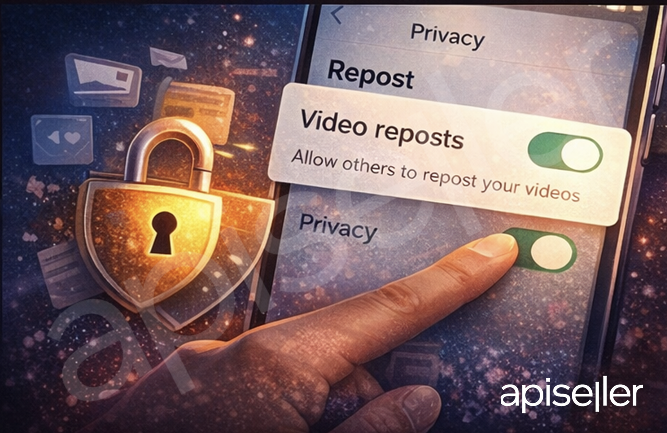
In some TikTok app versions, creators report a toggle under Settings and privacy → Privacy → Repost → Video reposts that controls whether others can repost your content. This control is not clearly documented on TikTok’s public Help Center pages the same way “Remove repost” is, so the exact wording/placement can vary by region/app version. One example walkthrough of this toggle is described here.
If you don’t see it:
-
You may be on a different UI version
-
The feature may be rolling out unevenly
-
The setting may be grouped under a broader “reuse”/privacy section depending on account type
Troubleshooting: Repost not showing / not working
1) Repost button is missing
Try:
-
Update TikTok
-
Clear cache / restart the app
-
Log out and back in
-
Test on a different video (some content may restrict repost options)
2) Repost tab doesn’t appear on my profile
If you haven’t reposted anything yet, the tab may not be visible. Also remember: private accounts limit who can see reposted content—TikTok notes only followers can see all reposted content on your profile and in their FYP.
3) I can’t stop people from reposting my videos
Look for the “Video reposts” privacy toggle (if available in your app build). If it isn’t there, you may need to manage exposure in other ways (e.g., limiting post visibility to Friends/Only you for specific posts). TikTok explains how to change post visibility settings on new/existing posts.
Best Practices: Anti-Spam Repost Strategy
For reposters (to avoid looking spammy)
-
Repost only content that matches your niche (your Repost tab is your public “taste”)
-
Don’t repost 10 things in a row—your profile starts to feel like a scraper
-
Use a simple rule: Would I be proud if a new visitor judged my account only by my Repost tab?
For creators (to benefit from reposts)
-
Optimize profile for “visit → follow” conversion (clear niche in bio, pinned videos, consistent topics)
-
Make content easy to repost: tight hook, clear payoff, clean messaging
-
If reposts harm your brand, consider limiting repost permissions (if your app supports that toggle).
Commercial Growth: Using Repost the “safe” way

Repost can support business growth, but the best results come when you combine it with official tools and transparency.
1) Use Promote to amplify winning posts
TikTok describes Promote as an advertising tool to improve engagement and visibility by promoting your content (typically as an ad). It also provides campaign tracking (views, profile visits, followers, clicks, etc.).
Practical play:
-
Identify videos that already earn reposts/saves/comments
-
Promote those to expand reach faster
2) Use Spark Ads for “native” scaling
TikTok for Business explains Spark Ads as a way to leverage organic TikTok posts and their features in advertising (so your best organic content can become your best-performing ad creative). TikTok For Business
Practical play:
-
If creators repost your video and it’s performing well, you can explore creator/brand collaborations and then scale proven content with Spark Ads (with proper permissions).
3) Disclose commercial content correctly
If you’re promoting a brand, product, or service, TikTok requires turning on content disclosure settings to be transparent (Promotional content / Paid partnership). TikTok notes this helps maintain trust and that failing to disclose may lead to restriction/removal.
FAQ
Do reposted videos show on my profile?
Yes. TikTok states you can find reposted videos on your profile under the Repost tab.
Can I remove a repost?
Yes—Share → Remove repost (or long-press → Remove repost).
If my account is private, can everyone see my reposts?
TikTok says if you have a private account, only your followers can see all your reposted content on your profile and in their For You feed.
Can I stop others from reposting my videos?
Some app versions show a privacy toggle (Privacy → Repost → Video reposts). Availability and naming can vary by region/version.